Six modules, one machine, fully offline.
Not six disconnected tools but one complete workstation: one interface, one model manager, one privacy baseline — every screenshot below looks exactly the same on a machine with no internet.
AI Chat
A complete AI chat experience with the model running locally — your conversations never leave your computer. Switch between open-source models, with deep thinking mode and image understanding.
- Long context — Context length depends on the selected model — up to 128K. Long documents and conversations are never silently truncated.
- Thinking mode — Enable it for deep reasoning; the model's thought process can be expanded and inspected.
- Image understanding — Paste images straight into the chat — interpreted by an on-device vision model.
- Developer friendly — Built-in OpenAI-compatible API endpoint, so advanced users can connect their own tools.
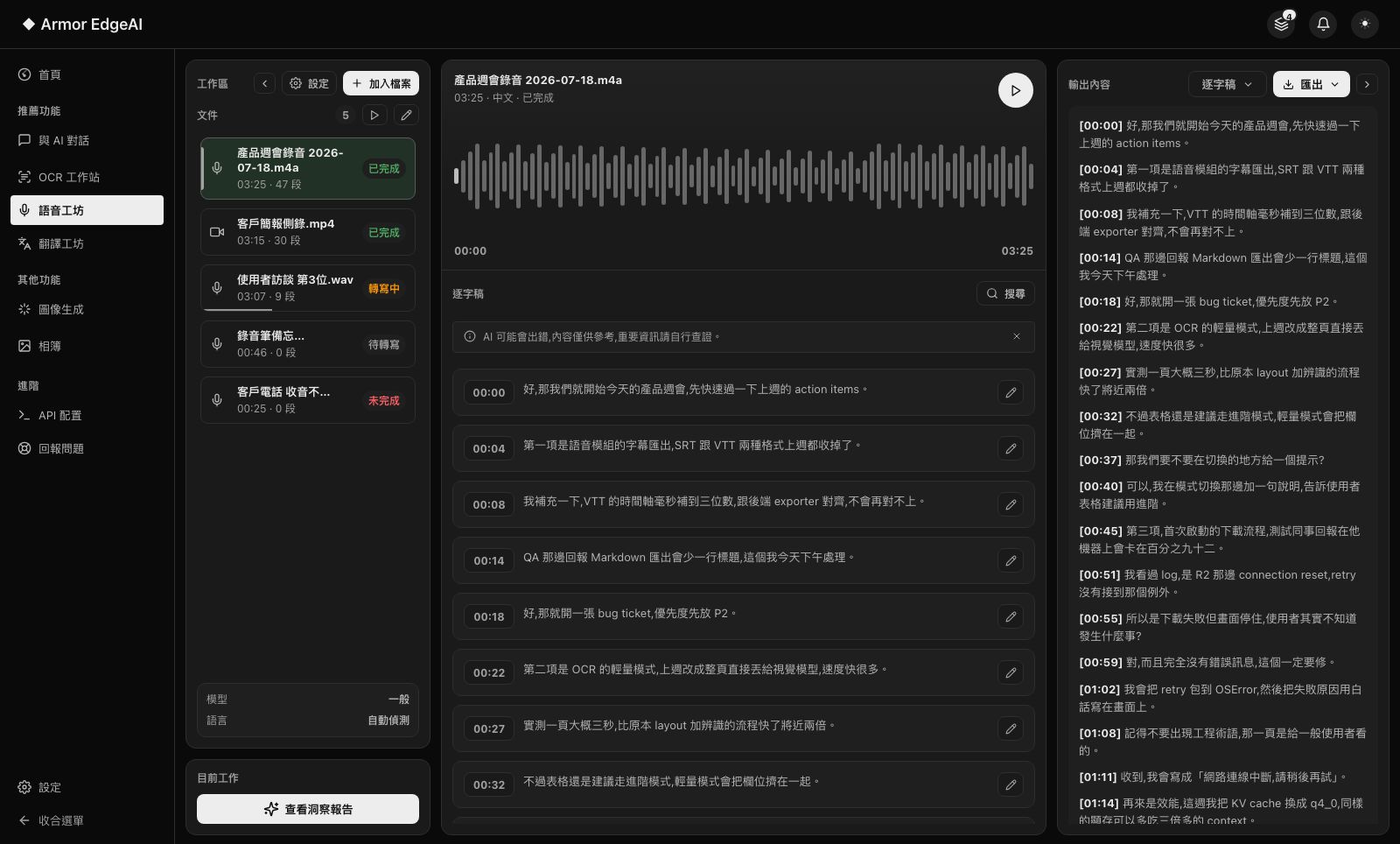
Speech Studio
Drop in meeting recordings, interviews or videos — the on-device engine produces transcripts; videos play in theater mode with synced subtitles, and transcripts turn into summaries, mind maps and Q&A.
- Audio & video — Common audio and video formats import directly for transcription.
- Synced transcript — Text highlights as playback advances; click a line to jump to that moment.
- Subtitle export — Transcripts export as subtitle files.
- Insight reports — One click turns a finished transcript into summaries, mind maps and Q&A.
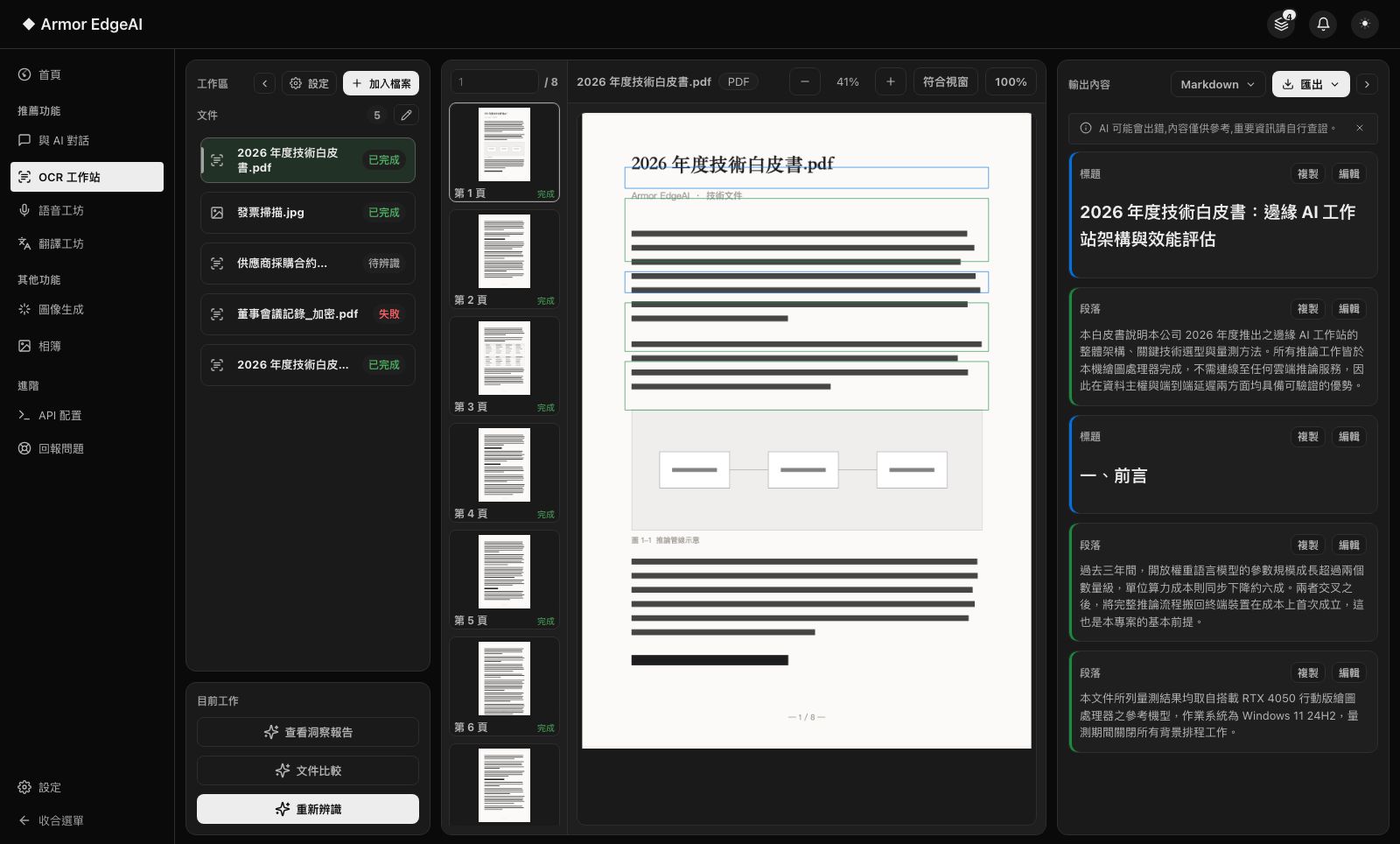
Document Recognition
Advanced mode does full layout analysis with high-accuracy recognition; light mode hands whole pages to a vision model for fast text. Results feed into document comparison and insight reports.
- Two modes — Advanced (layout + high accuracy) or light (fast whole-page text) — switch as needed.
- Structure preserved — Tables, flowcharts and other structured content are not lost.
- Document compare — Two documents side by side, changes at a glance.
- Insight reports — Summarize and organize recognized content into reports directly.
Translation Studio
Not a paste-and-pray translation box: import a document, translate segment by segment against the source, refine until it reads right, then export — confidential files never touch a cloud translation service.
- Segment refinement — Source and translation side by side; adjust each segment until you're satisfied.
- Document import — Supports PDF and other document formats, preserving paragraph structure.
- Context aware — Bring surrounding text and terminology hints into each translation for consistency.
- Fully offline — Contracts, financials and research documents never leave the machine.
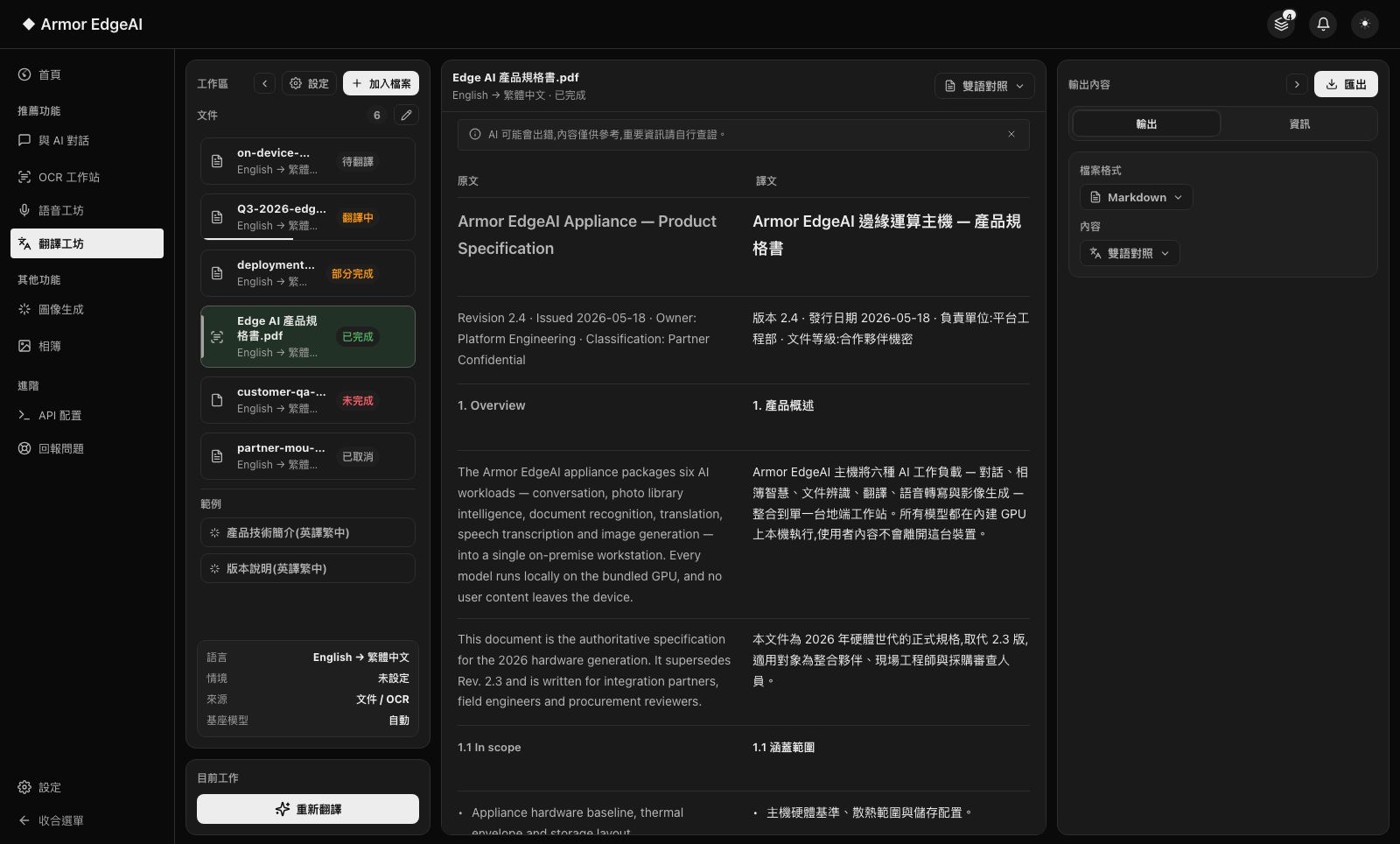
Image Generation
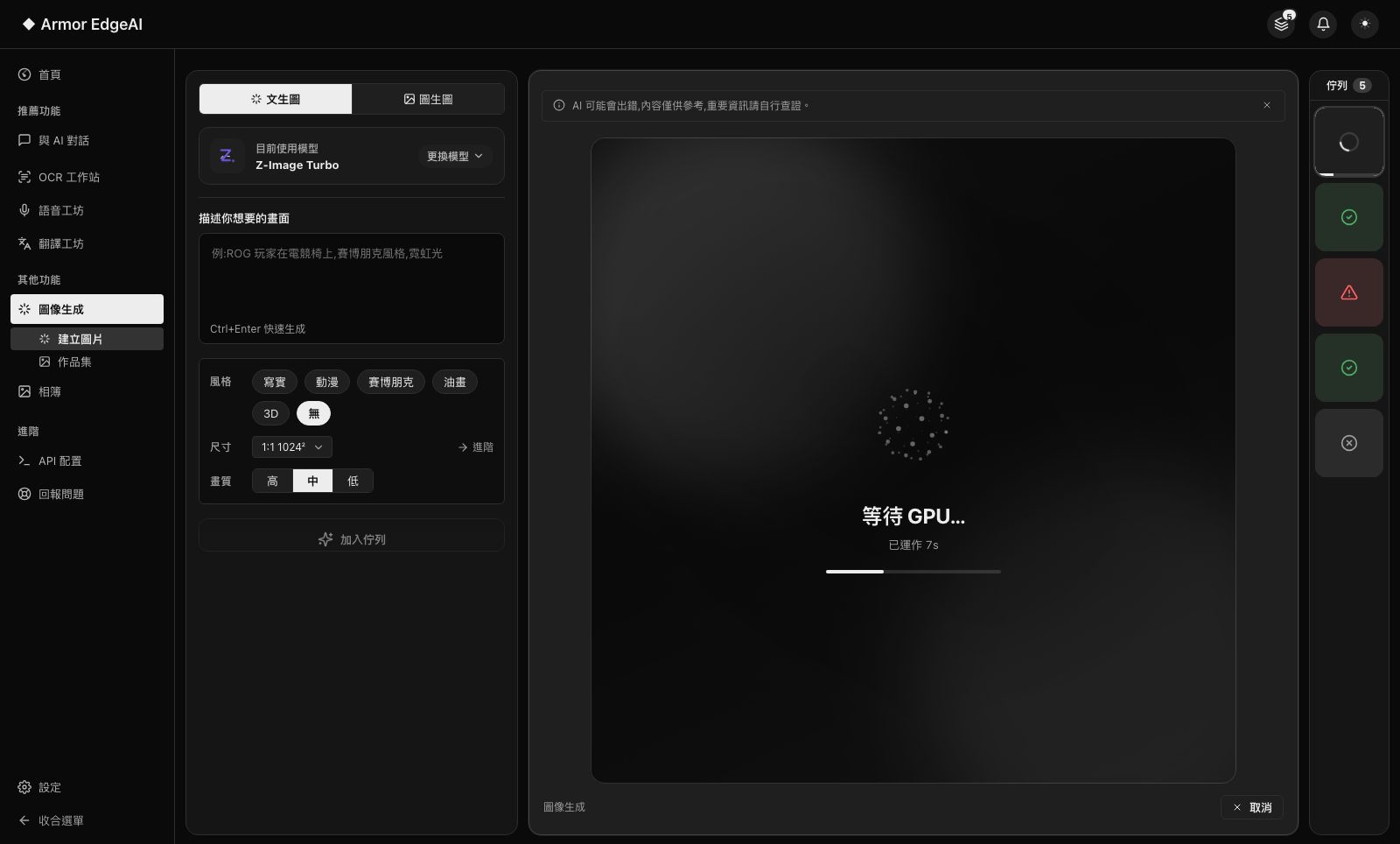
Generate on your own GPU: text-to-image and image-to-image with a choice of open-source models and styles, up to 2K output, everything saved to your gallery — no queues, no credits, no uploads.
- Text-to-image + image-to-image — Start from a sentence, or from a base image.
- Multiple models — Speed-first or quality-first — pick the model that fits.
- 2K output — Up to 2K resolution, ready for delivery and post-processing.
- Gallery — Generations and parameters are saved automatically — revisit and regenerate anytime.
Smart Photos
Hand your photo folder to an on-device vision model: automatic descriptions and tags, one-line semantic search, people grouping and auto-curated memories — photos never get uploaded.
- Semantic search — Find photos in natural language — "sunset at the beach last year" — not by filename.
- People grouping — Automatically recognizes and organizes photos of the same person.
- Memories — Auto-curated memory decks by time and theme, ready to browse.
- Photos stay local — Analysis, indexing and search all happen on your machine.
The specs, stated plainly.
Only a few numbers — but each one directly affects your data and your experience. Actuals depend on your device and model choices.
Recommended hardware
Every module runs on standard configurations; machines with a discrete GPU and 16 GB+ RAM get the best experience for image generation and larger models. The app recommends models suited to your hardware.
Storage
Models download on demand — typical combinations take about 3–25 GB. Add or remove them anytime in the model manager, with usage shown at a glance.
Languages
The interface is in Traditional Chinese; chat and translation models are multilingual (Chinese, English, Japanese and more, model-dependent).
Updates
New versions download in the background and apply on next launch; model and engine updates never interrupt your work.
Measured performance
The same test suite, run end-to-end on two configurations — from a flagship desktop to a 6GB laptop GPU, every AI feature runs locally.
| Test | Maximum configurationGeForce RTX 5090 (32GB) | Recommended configurationGeForce RTX 4050 Laptop (6GB) | CPU-only modeIntel Core i7-13620H (same laptop as recommended) |
|---|---|---|---|
| Chat generationQwen3.5 2B | 443 tokens/s | 100 tokens/s | 23 tokens/s |
| Chat generationGemma 4 E2B | 326 tokens/s | 83 tokens/s | 21 tokens/s |
| Document OCR10-page product catalog | 5.9 s/page | 14.9 s/page | 107 s/page |
| Speech transcription180-second real interview recording | 6.1 s | 8.9 s | 84 s |
| Image generation (1024×1024)Z-Image Turbo (default model) | 8 s | 286 s | Not recommended |
| Image generation (1024×1024)FLUX.2 klein | 13 s | 79 s | Not recommended |
| 2K output (2048×2048)Z-Image Turbo + detail upscale | 20 s | 354 s | Not recommended |
- Measured on Armor EdgeAI 0.55.0 with models downloaded and warm-loaded (first load takes longer). Chat speed is decode tokens per second.
- Speech is measured on a real 180-second interview recording; image times on the recommended 6GB configuration include staged weight loading (full end-to-end time).
- CPU-only mode = the same recommended laptop with GPU acceleration disabled — chat and speech remain usable; image generation is recommended on RTX GPUs.
Got the machine? Four steps.
Unbox, agree, activate, download models — most of the time is just the download.
Get started